Control the upload experience: What's new in DriveUploader
We've shipped three major updates designed to give you more control over how your uploader looks and feels, while making the uploading process seamless and worry-free for your users. Here is what's new and how to make the most of it.
Your form and the upload, together on a single screen
Until now, collecting files and information happened in steps: your users picked their files first, and the form fields appeared afterward. While this multi-page setup works great for complex workflows, sometimes you just want to keep things simple.
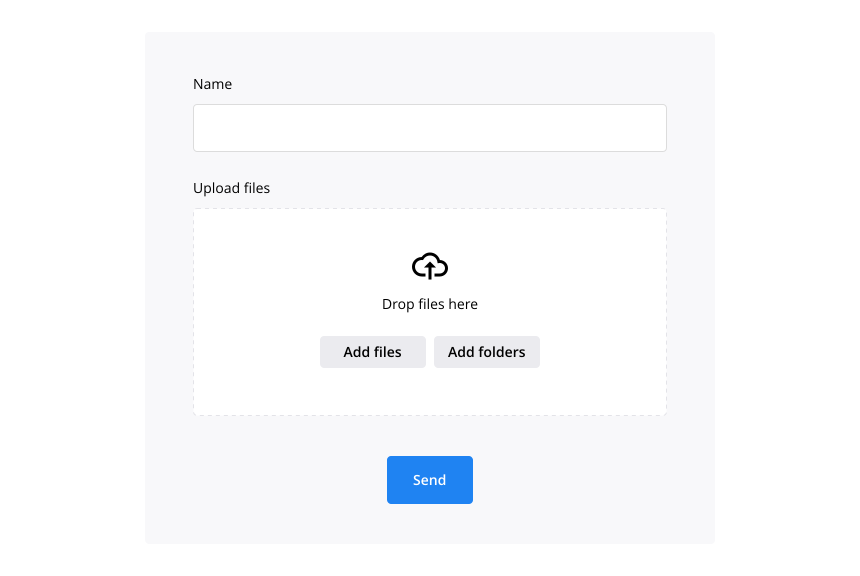
The new One-page uploader displays your form fields and the upload widget together on a single screen, with the submit button right below. Your users simply fill out the form, drop their files, and send.
No extra steps, no waiting for the next screen, and zero surprises. Minimizing the friction between "I want to send this" and "Done" means higher completion rates and fewer abandoned uploads.
Ready to try it out? Follow our step-by-step tutorial on how to enable the One-page layout in your admin dashboard.
A brand new file queue for your users
In the traditional multi-page uploader, files are processed immediately. While fast, this has one major UX drawback: once the files started uploading, the user was instantly pushed to the form step. There is no space to review, manage, or double-check the uploaded files before hitting send.
With the new One-page uploader, we have solved this! We are introducing the File Queue.
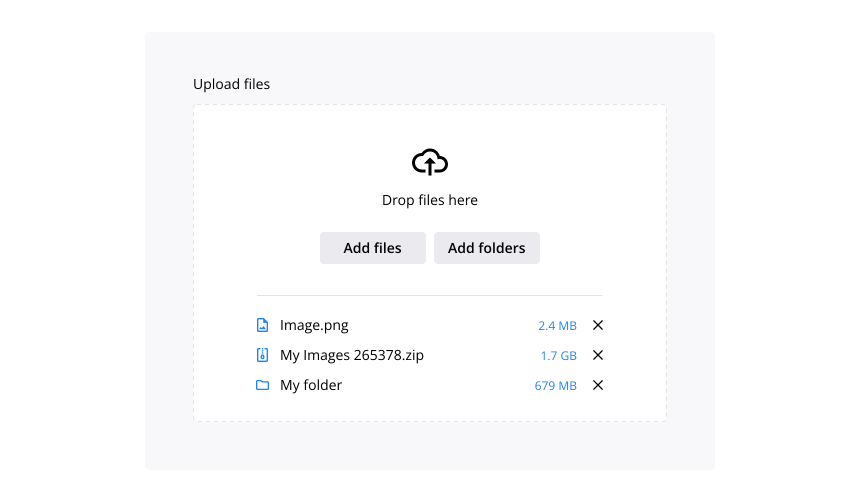
Now, when your visitors select their files, they remain clearly listed in a queue on the same page. Your users can easily review the file names, check the sizes, remove any accidental uploads, or add more files before finally clicking send. Giving your users this layer of control prevents mistakes and elevates their overall experience.
New uploader design: Ready-made themes & live preview
We've redesigned the look and feel of the uploader. Whether you choose the traditional multi-page workflow or our new one-page layout, your upload widget now boasts a sleeker, cleaner, and far more modern aesthetic right out of the box.
Ready-made Light & Dark themes
No time for custom design? No problem. In just one click, you can switch between a crisp, clean Light look or a bold, modern Dark aesthetic. It's the fastest way to get a professional-looking uploader without touching a single color picker.
Enhanced custom styling with live preview
For those who want full brand alignment, our Custom design option gives you pixel-perfect control over every color, button shape, and font. To make styling frictionless, we added a Preview button. Now, you can open a live preview of your uploader in a new tab that refreshes instantly as you make changes. You see exactly what your clients will see before you even hit save.

Ronald is a content creator at DriveUploader. With a deep passion for storytelling and a knack for research, he excels in crafting engaging content across various topics. We love him for his creativity and unique perspective.