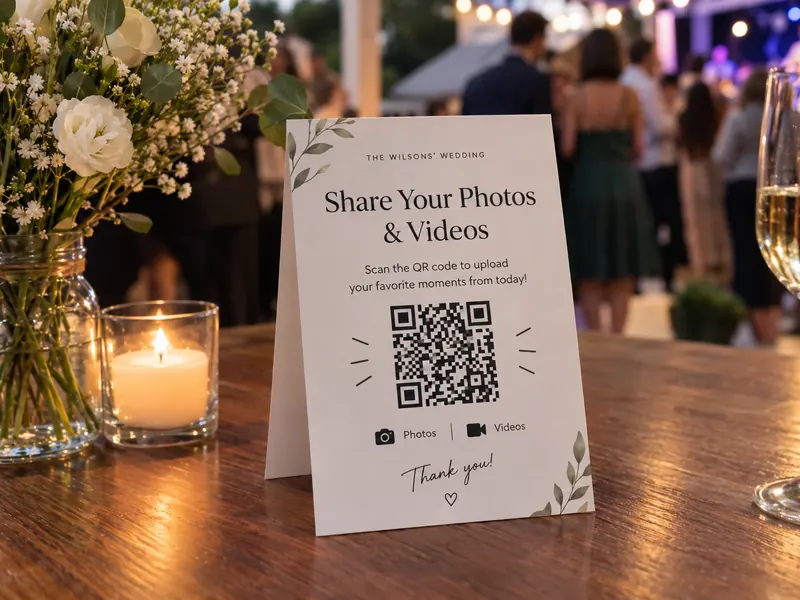
Event photos from every guest, straight to Google Drive
One QR code or link for your event. Guests upload photos and videos in full quality from their phones — no app, no login — and everything lands in your Drive.
Trusted by 300,000+ users from all industries.
Problem
Guests take hundreds of photos and videos, and almost none of them reach you.
WhatsApp and social media shrink photos and videos to low quality.
Guests won’t download an app or create an account just to share a few photos.
How it works
Name it, add your logo and choose the Drive folder. Optionally ask for a name or the day.
Print it on tables, badges, screens and the program, or send the link after the event.
Full-quality photos and videos land in the event folder, sorted by day or contributor.
Set up your event in two minutes.
Photos can start arriving today.
Use cases
QR codes on tables, badges and screens let guests upload straight from their phone.
Photographers and videographers upload whole folders of full-resolution files.
Speakers send slides, bios and headshots before your deadline, each into their own folder.
Sponsors upload logos and promo materials in the formats you ask for.
Birthdays, reunions and graduations work the same way, and couples collect photos from wedding guests too.
How guests send files
Print the QR code on tables, badges, screens or the program. Guests upload straight from their camera roll.
Post the link in your event app, a follow-up email or on social media. No account, no app.
Embed the uploader on your event page, with your logo and colors.
Custom forms
Add optional fields for the guest’s name, the session or day, and permission to share the photo on social media. Answers go to Google Sheets, photos to the right folder.
Organized in Google Drive
Photos and videos are sorted by event, day or contributor, based on the answers in your form.
See uploads arrive in real time, so you can share the best shots while the event is still on.
Route uploads into your team’s Shared Drive so marketing and social media can use them right away.
Automatic photo sorting
DriveUploader keeps every original file, and AI describes each photo, so your team finds the right shot for social media in seconds.
Try for freeOur happy customer
“In preparation for our wedding, we were concerned about how to get photos from so many guests. Luckily, we came across DriveUploader, which made it easier to collect photos from the entire wedding. Everything was simple, quick to set up and very intuitive for our guests.”
Templates
Guest and photographer photos described and sorted, so you find the right shot fast.
Sheet columns
Bios and headshots from every speaker, with names, titles and companies in one sheet.
Sheet columns
Slide decks from speakers, checked for title, length and format before the event.
Sheet columns
Logos and promo materials from sponsors, checked for format and background.
Sheet columns
Quotes from vendors side by side: price, delivery time and validity in one sheet.
Sheet columns
Integrations
A log of every upload with the guest’s name, day and permission to share.
Learn moreEmbed the uploader on WordPress, Wix, Webflow, Squarespace or any page that accepts embeds.
Build a formPost new photos to your social wall, Slack or event app. A webhook fires with every upload.
View API docsTell us which event software you use and we’ll prioritize it.
Suggest an appSecurity
Uploads go straight to your Google Drive. No copies stored on our servers.
Guests can upload, but they can’t see other guests’ photos or your folders.
Close the uploader after the event with an expiration date, or add a password.
Files are encrypted in transit and stored with Google’s security, the same as the rest of your Drive.
Handling EU guest data? Our Data Processing Agreement (DPA) is part of our Terms, so it covers every account.
Read the DPAPricing
Buy credits once and use them anytime. Every free account gets 10 AI credits each month. 1 credit = 1 photo or document processed by AI.
$0.09
per document
$9
Try for free$0.06
per document
$29
Try for free$0.04
per document
$79
Try for free$0.03
per document
$169
Try for freeUploading is free. Free uploaders stay open for 24 hours — enough for a one-day event. For longer events or uploads after the event, add a plan from $5.99/month.
See full pricingDriveUploader is an event photo sharing tool that saves guest photos and videos straight to your Google Drive. Guests scan a QR code or open a link and upload full-quality files from their phone, without an app or account. Event teams can also collect speaker slides, headshots and sponsor assets in the same place.
No. Guests scan the QR code with their phone camera or tap the link, and the upload page opens in their browser. There is nothing to install and no registration, which is why far more guests actually share their photos.
Every uploader has its own link and QR code. Download the QR code and print it on table cards, badges, screens or the event program. Guests scan it and upload photos straight into the event folder in your Google Drive.
Yes. DriveUploader saves the original files without compression, so photos keep their full resolution and videos their full length. Files only need to fit into your Google Drive storage, so photographers can deliver large files the same way. For very large events, keep in mind that Google allows up to 750 GB of uploads per day per account.
Not through the uploader. Guests can only upload, so every photo stays private to you and your team. If you want to share the photos afterwards, share the Drive folder with view access or pick the best shots for a gallery. DriveUploader doesn’t include a live photo wall or slideshow.
Event photo apps usually keep photos in their own gallery. DriveUploader saves every original file straight to your Google Drive, where your team already works, and adds custom forms, AI photo descriptions and Shared Drive support. It also collects speaker materials and sponsor assets, not just guest photos.
Yes. Keep the uploader open as long as you need and send the link in your thank-you email. Free uploaders stay open for 24 hours; for uploads in the days after the event, use a plan.
You can start for free. Free uploaders stay open for 24 hours, which is enough for a one-day event. For longer events or uploads afterwards, plans start at $5.99/month; custom forms need the Pro plan. AI photo sorting is optional and uses credits, starting at $9 for 100 photos. With the Team plan, your whole event team manages uploaders in one workspace.
Yes. It works the same way for birthdays, reunions and other private events. Planning a wedding? See how couples collect photos from wedding guests.
Create your event QR code in 2 minutes. Guests won’t need an app or an account.